
ISO 27001 software: what to look for and how to compare
Good ISO 27001 software runs the whole management system in one place: the risk register, the Statement of Applicability, policies, evidence, internal audits and the auditor’s access. If a tool leaves any of those to spreadsheets and shared folders, you will rebuild them by hand before every audit. Judge each option on six things: coverage of the standard, evidence collection, reuse across regulations, where the data is stored, the effort to get live and the real cost over a year.
This guide is written for EU companies of 10 to 250 employees preparing for certification or proving security to customers, for organisations in scope of NIS2 or DORA, and for consultants who manage several clients.
What ISO 27001 software actually does
ISO 27001 is the international standard for an information security management system (ISMS): the set of policies, risk decisions, controls and records through which a company manages information security. A certification body audits that system and issues the certificate. The standard was revised in 2022, and the transition from the 2013 edition ended on 31 October 2025, so any tool you buy today should be built around the 2022 edition and its Annex A.
Software does not make you secure and does not replace the decisions of your management. What it does is hold the system together. It keeps the risk assessment, the control decisions, the documents, the tasks and the proof in one place, links them to each other and shows who owns what. A certification audit is, in practice, a request to show that what you wrote down is what you do. The more of that trail the software builds as a by-product of daily work, the less you assemble in the weeks before the auditor arrives.
For a company of 10 to 250 people the pressure is usually the same. A customer’s procurement team asks for the certificate or for a security questionnaire, nobody has the time to run a project of this size, and the people who understand the systems are also the people running them. The right tool is the one that removes the coordination work, not the one with the longest feature list.
The six things the tool must cover
Use this as your checklist. A product that cannot do each of these inside one system will push you back into manual work.
1. Risk register and risk assessment
The standard asks you to define a risk assessment method, apply it consistently, rate risks, decide how to treat them and have risk owners accept what remains. Your auditor will test whether the same method was applied to every asset and whether results are comparable year to year.
What the software should do:
- hold an asset and information register that risks link to;
- let you set your own scales for likelihood and impact, so the method is yours;
- record a treatment decision and an owner for each risk, with a date for review;
- carry risks forward to the Statement of Applicability, so a control is selected because of a risk and not by habit.
For the method itself, a practical guide to Clauses 6.1.2 and 8.2 explains how the assessment and its repetition fit together.
2. Statement of Applicability
The Statement of Applicability (SoA) lists every Annex A control, says whether you apply it, why, and whether it is implemented. Auditors start here, because it is the map of your whole system.
A useful tool generates the SoA from your risk treatment, keeps a change history and links each line to the policy, the owner and the evidence behind it. If the SoA is a static document that sits beside the tool, it will be out of date by the next review. Look for a live view that you can show an auditor on screen and filter by status.
3. Policies and documented information
ISO 27001 requires documented information, and requires you to control it: version, approval, distribution and review. Templates help, but they are only a starting point. What matters is the workflow around them.
Check for:
- ready policy templates in the language your staff and auditor use;
- approval by named people, with a timestamp;
- attestation, meaning staff confirm they have read the policy, recorded in the system;
- review reminders, so nothing quietly expires.
A policy library that you copy into a document editor and then manage by email is not document control.
4. Evidence collection
Evidence is the proof that a control operates: an access review, a backup log, a list of devices with disk encryption, a record of a code review. Collecting it by hand is the largest hidden cost of an ISMS, because it repeats every cycle.
Integrations with the tools you already run reduce that cost. Ask which systems the platform connects to (your identity provider, cloud accounts, code repositories, endpoint management, ticketing), what exactly it pulls from each, and how often. Then ask what happens to controls that no integration can reach, such as a physical security check or a supplier review. A good tool lets you attach manual evidence to the same control, with an owner and a due date, so the record is complete in one place. More on the principle is in how automated evidence collection works.
5. Internal audit and management review
The standard requires internal audits at planned intervals and a management review of the system. Both leave records that a certification auditor will ask to see.
The software should let you plan an audit programme, create checklists tied to controls and clauses, log findings and nonconformities, assign corrective actions and track them to closure. For management review, it should assemble the inputs the standard lists, such as the status of actions, audit results and changes in risk, so the meeting is based on current data. A dashboard that shows leadership the position in one screen is useful here, because it makes the review a short, informed decision and not a document chase.
6. Auditor access
When the certification audit starts, the auditor needs to see the SoA, risk records, policies, evidence and audit results. Without a tool, you send folders by email and answer follow-up questions one at a time.
Look for an auditor portal: a restricted, read-only view, with a way to sign off or comment, and an export of an evidence pack for the audit scope. This also helps after certification, as surveillance audits come back each year and the same pack can be refreshed rather than rebuilt.
For a closer look at the standard itself, see what ISO 27001 is and who it covers.
Which kinds of ISO 27001 tools exist
You will find the market easier to read if you sort tools by type before you compare individual products. The types differ in what they assume about you.
| Type of tool | Built around | Where it fits | What to check |
|---|---|---|---|
| ISMS-only software | The clauses and Annex A of ISO 27001 | A company with one goal: certification | Whether it extends to GDPR, NIS2 or DORA later |
| GRC platform for many standards | One control set mapped to several frameworks | Companies with several customers or regulators asking for proof | Depth of the ISO 27001 workflow, not only the number of frameworks |
| Automation-first compliance platform | Integrations and continuous checks | Cloud-heavy, engineering-led teams | Controls the integrations cannot reach, and policy depth |
| Consultancy-led toolkit | Document packs and advisory hours | Teams that want a person to carry the project | What you keep once the engagement ends |
| Enterprise GRC suite | Large risk and audit programmes | Organisations with a dedicated GRC team | Set-up time and cost against your team size |
For most companies with 10 to 250 staff, the middle two rows are the realistic shortlist, and the question is how much of the work the platform removes. If you operate under several regulations, the second type usually pays back sooner, because it is built to share work between them.
Reuse across ISO 27001, GDPR, NIS2 and DORA
Many of the companies reading this have more than one obligation. The sensible way to buy is to look at them together.
GDPR requires appropriate technical and organisational measures to secure personal data. The text of the Regulation is the authority, and an ISMS gives you a structured way to run and evidence those measures.
NIS2 is a directive, so each member state transposes it into national law, and the date for that was 17 October 2024. Its Article 21 sets out cybersecurity risk-management measures for entities in scope. The Commission’s 2024 implementing text for specified digital providers says the technical and methodological requirements are based on European and international standards, including ISO/IEC 27001 and ISO/IEC 27002. That does not make a certificate a legal substitute, but it does mean an ISMS covers much of the same ground. See what NIS2 is and who it covers for scope.
DORA applies to financial entities and has applied since 17 January 2025. It is a regulation, so it applies directly. ISO 27001 remains voluntary and does not replace DORA, but a mature ISMS gives you the risk, asset, supplier and incident records that DORA also expects. The legal text is Regulation (EU) 2022/2554, and DORA: what it is and who it covers summarises the scope.
Incident reporting is a good example of overlap with a deadline attached. Both regimes use a staged pattern: an initial report within 24 hours of becoming aware, a further report at 72 hours and a final report within one month. Your tool should hold one incident record that feeds each report, rather than three separate documents.
What to ask a vendor:
- Is there one control library that maps to each regulation, so an item of evidence is attached once and counts everywhere it applies?
- When you add a framework later, does the platform show which requirements are already covered?
- Can you see status per regulation without exporting data?
If the answer to the first question is no, you will do the same work again for each new framework.
EU data residency, integrations and support
The compliance records you store are among the most sensitive documents a company has: weaknesses, risks, supplier details, and often personal data of staff. Where they live matters.
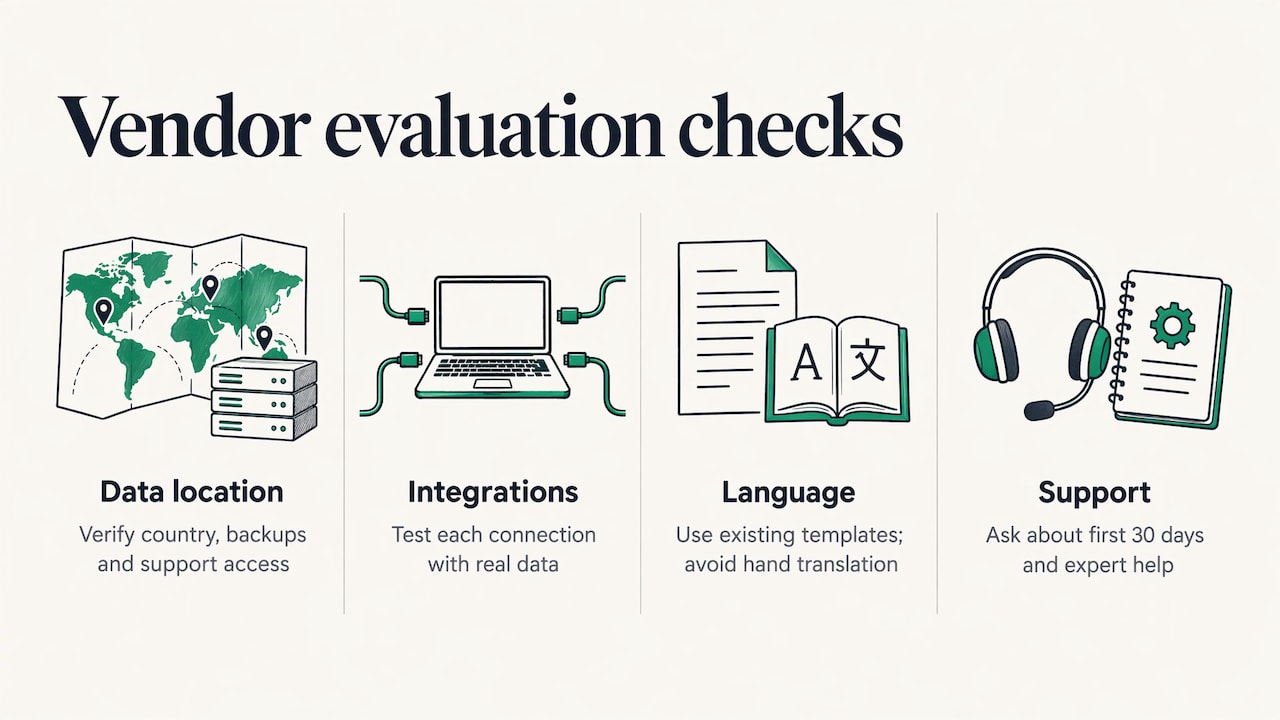
Data location. Ask for the country and the provider where the data is stored, and whether backups and support access stay in the EU as well. Ask which sub-processors the vendor uses, since the GDPR requires a processor to have a written agreement with you and to stay within your instructions. If your customers or regulator expect EU-only storage, get the statement in writing before you sign.
Integrations. List the systems you need to connect before the demo, and ask to see each one working with real data, not a slide. Pay attention to the depth: reading a user list is different from reading access reviews, change history and configuration state.
Language. If your policies, staff training or auditor use a language other than English, check that the templates exist in it. A policy translated by hand after the fact breaks the version control the tool is meant to provide.
Support and implementation. Ask what an average customer of your size does in the first thirty days, who sets up the integrations, and whether expert help on the standard itself is available when you hit a question the software cannot answer. A tool without guidance on how to run an ISMS leaves a small team with the hardest part.
How to compare options without getting lost
A feature checklist makes every product look similar. A short test sequence tells you more.
- Write your scope first. Which entities, sites, systems and services will the certificate cover? A tool should be judged against this scope, not an average customer.
- List your regulations. Note ISO 27001 plus any of GDPR, NIS2, DORA or customer-specific requirements. This decides whether you need a single-standard or multi-standard tool.
- Run the same scenario in each trial. Create one risk, link it to a control, attach evidence, assign an owner and produce the SoA entry. Time it and note where you needed help.
- Test the auditor view. Ask for a demonstration of exactly what an external auditor sees and how an evidence pack is produced.
- Ask about exit. Can you export your register, SoA, policies and evidence in a usable format if you leave? Your ISMS records are yours.
- Work out the cost over twelve months. Include the subscription, onboarding, any paid modules or integrations, extra users and additional frameworks. A low entry price that excludes the auditor portal or a second framework is not low.
- Check the people side. Software removes administration, but someone in your company must own the system. Decide who that is before you buy.
For consultants who manage several clients, add two points: whether each client has a separate workspace with its own data, and whether you can reuse your own templates across them.
Common mistakes
- Buying on framework count. A tool that lists fifty standards but has a thin ISO 27001 workflow will cost you time on the one standard you need now.
- Treating templates as the product. Templates are quick to find. Evidence, ownership and audit trail are what take months.
- Forgetting the surveillance cycle. Certification is the start. The tool must make year two and year three lighter.
- Skipping the readiness check. Before you configure anything, test where you stand against the standard, so the project starts with real gaps and not guesses. A short ISO 27001 readiness test is a quick way to do that.
Pricing: what to expect and how to read it
Vendors publish prices in very different ways. Some list plans per month, some quote per framework or per user, and some publish nothing until a sales call. Treat any price as valid for the date it was published, and ask for the full twelve-month figure in writing.
When you request a quote, ask the same questions each time:
- Which plan includes the auditor portal, integrations and risk register?
- Is the price per user, per framework, per entity or flat?
- Are onboarding, training or expert support included?
- What happens to the price when you add NIS2 or DORA?
- Is there a minimum term, and can you pay monthly?
An honest comparison sets these answers side by side. If a vendor will not state them, assume the gaps will show up later on the invoice.
Where Guardiso fits
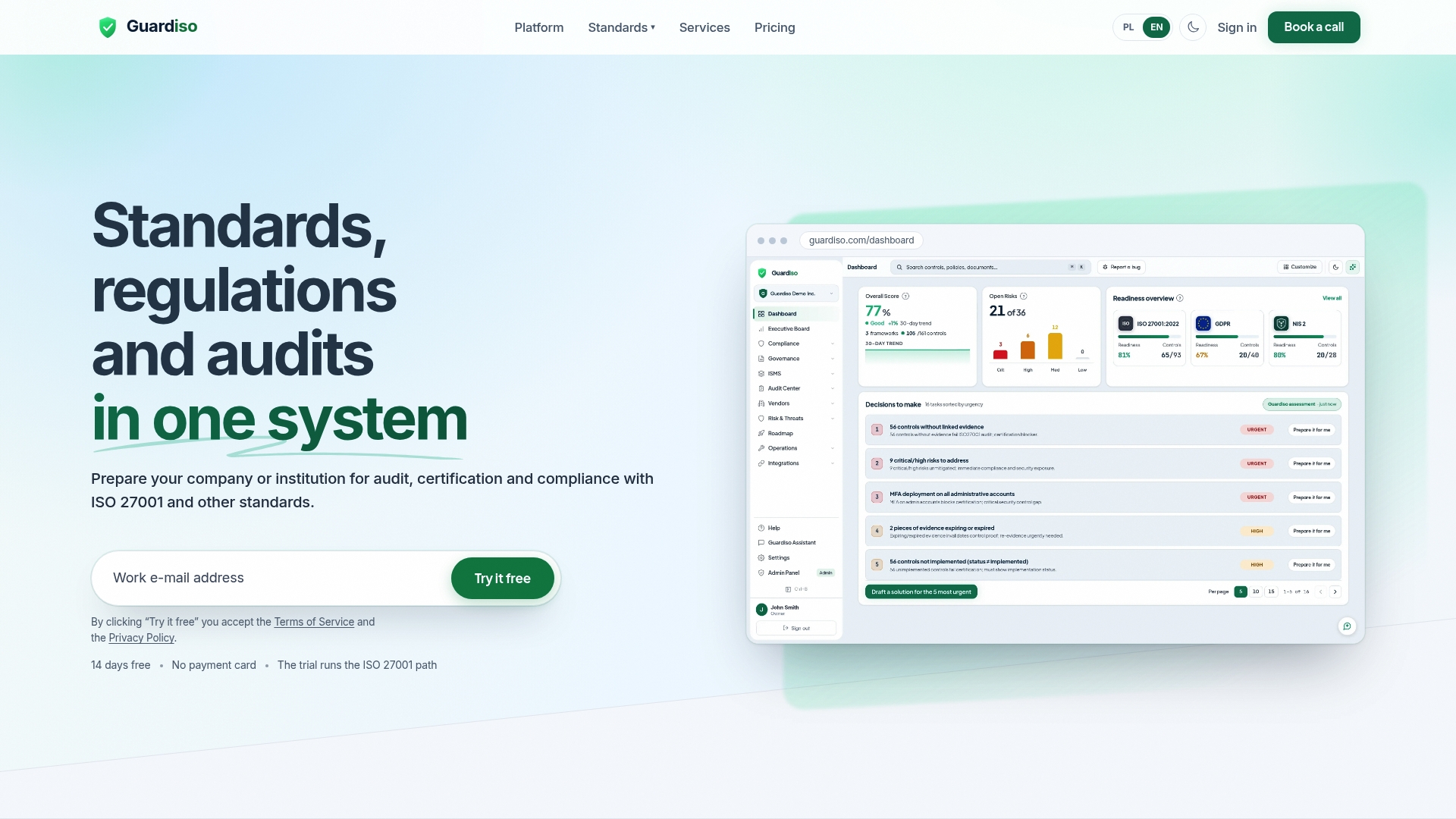
Guardiso is an example of a European GRC platform with data stored only in the European Union. Firma Guardiso is an ISO 27001 certified company, and the platform runs ISO 27001, GDPR, NIS2, DORA and other standards in one system. One set of documents and evidence serves several regulations, so a team does not repeat the same work for each framework. It collects evidence from Microsoft 365, GitHub, AWS and other tools, offers ready policies in English and Polish, and prepares an evidence pack for the auditor before an audit.
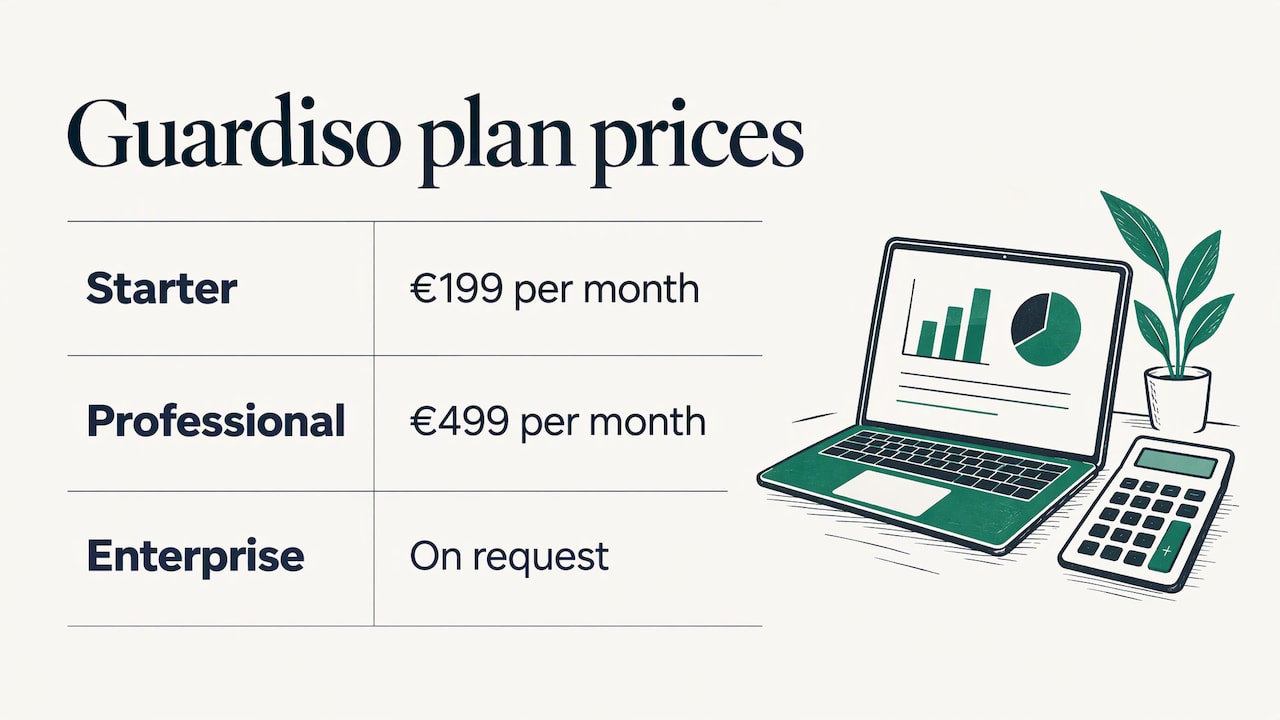
Plans are listed on the pricing page: Starter at €199 per month and Professional at €499 per month, with Enterprise on request, as published in November 2026.
If your obligations also include NIS2, the guide to NIS2 compliance software shows how to apply the same criteria to that directive.
FAQ
Do I need software to get ISO 27001 certified?
The standard does not require any particular software. It requires a working system with records, and software is a way to keep those records consistent and ready for an auditor. The larger your scope and the more regulations you handle, the more a connected tool saves.
What is the difference between ISO 27001 software and a GRC platform?
ISO 27001 software is built around the clauses and Annex A of one standard. A GRC platform manages governance, risk and compliance across several frameworks from one control library. If you expect to add GDPR, NIS2 or DORA, the broader platform avoids repeating the work.
Does ISO 27001 certification satisfy NIS2 or DORA?
No. ISO 27001 remains voluntary and does not replace DORA, and NIS2 sets its own legal requirements through national law. An ISMS does give you much of the risk and control evidence both regimes ask for, so the work is shared.
What should I ask about data storage?
Ask in which country the data and backups are stored, who can access them, and which sub-processors are involved. For EU organisations, EU-only storage with this confirmed in writing makes it easier to answer customer and regulator questions.
How long does it take to get live on a platform?
It depends on your scope, the number of integrations and how many people own controls. Ask each vendor for a realistic plan for a company of your size, and run your trial scenario before you decide.
Sources
- ISO 27001:2022 transition, ended 31 October 2025
- GDPR, Regulation (EU) 2016/679
- NIS2 Directive (EU) 2022/2555
- DORA, Regulation (EU) 2022/2554
- European Commission implementing text, 17 October 2024
- DORA and NIS2 comparison, 2026
- Cyber Resilience Act, NIS2, DORA and ISO 27001 comparison